Payment Options
When it comes to purchasing the products you love, you have a host of options.
To Pay with a Credit or Debit Card
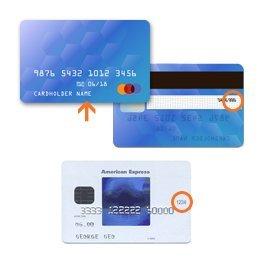
When you pay with a credit or debit card, you need the name printed on the card, the card number, the month and year the card expires, and the 3-digit or 4-digit security code.
This information, along with the billing address for the credit card, is entered during the purchase process. For more information, see Placing an Order.
These credit cards are accepted at all of our stores and websites.




Debit cards issued by the financial services companies listed above are accepted at all of our stores and websites.
To Pay with a Gift Card
You can use a physical or electronic gift card from any of our brands, as well as an Options gift card, to purchase merchandise or services at any of our online stores.
Gift cards can't be used to make payments on any credit card account.
-
When you're ready to purchase, go to checkout (or click the Checkout button in the top right corner of the website).
-
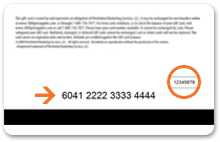
In the payments section of checkout, type the 16-digit gift card number and 4-digit PIN (found on the back of the card) exactly as they appear.
-
Click Apply.
You see a confirmation message that the gift card value has been applied.
You can apply up to five gift cards per order. To use another gift card, repeat steps 2–3 above.
To pay with a Gap gift certificate, merchandise credit, or coupon received before July 2009, contact us.
What happens next?
When you use a gift card, we charge the card as soon as you place your order. If your purchase total is more than the value of your gift card, you can use another payment method to pay for the difference.
If your purchase total is less than the gift card's value, the gift card carries that remaining balance until you use it another time. For more information, see the topic about checking a gift card balance on Buying a Gift Card.
If the item you want to purchase becomes unavailable, or it's on back order and you choose to cancel it before it ships, we send you a new gift card to cover the cost of the item, plus any applicable taxes and promotions. We don't add the value back to the original gift card.
To Pay with Rewards
As a member of the Gap Inc. Rewards Program, you earn points that can be redeemed for rewards in $1 increments. Rewards can be redeemed at our Family of Brands for the purchase of merchandise. Rewards cannot be used for the purchase of gift cards, for taxes or state fees, packaging fees, shipping & handling or delivery charges, charitable donations, and gift wrap charges.
To Redeem Online
- Log in to your account at checkout
- The “My Rewards” section will display your available points balance, as well as any valid rewards certificates
- Select the amount of points you want to redeem from the drop down
- Select “redeem” button to apply your rewards to your total
To Redeem In Store
- Enter your phone number on payment terminal
- Alternatively, associates can look up an email address
- The associate will see the customer's available rewards points balance, as well as any valid rewards certificates
- The customer can choose how many rewards they wish to redeem
What happens next?
A message appears to confirm that the code has been applied to your order.
When you use a reward, we deduct that amount from your purchase total before charging for the remainder.
For more information, see About the Rewards Program.
To Pay with a Promotional Discount
Each promotion, or special offer, has a code that you can type in during checkout, which tells our system to apply that particular offer or discount toward your purchase.
Note: Before using any promotion, be sure to check its terms and conditions for specific guidelines, exclusions, and restrictions. Some promotions are good only for certain items or have other limits on use, while other promotions require that any remaining balance be paid using a Gap Inc. Credit Card. Most of our promotions cannot be combined with other offers or discounts.
- When you're ready to purchase, go to checkout (or click the Checkout button in the top right corner of the website).
- In the payments section of checkout, enter the promotion code exactly as it appears in the promotion, including uppercase or lowercase letters. Be sure to avoid including a space before the promotion code, which sometimes happens if you cut and paste from an email or other electronic communication.
The codes are usually a combination of letters and numbers. Unique promotion codes are 12 characters long (for example, “PWFXYPFGC2DD”). General promotion codes may be shorter and represent the promotion more clearly (for example, “FREESHIP” or “TAKE30OFF”).
Depending on the promotion, you may be able to apply more than one promotion code to a single online order. For example, if you have a promotion code for free shipping, and another for 10% off an item, you may be able to use both.
What happens next?
A message appears to confirm that the code has been applied to your order.
Promotion code values are applied to your purchase total first. You can use another payment method, such as a Gap Inc. Credit Card, to pay for the difference. (Many promotions have specific payment requirements, so be sure to check the details of the promotion before using it.)
If the message says a promotion can't be applied: This usually happens when a promotion has expired or can't be used with the items you want to purchase. Read the promotion terms and conditions carefully to understand how the promotion can and can't be used.
Also, some promotions cannot be combined. If you try to apply two such promotions, we apply the one that has the biggest benefit to you and explain what we did in a message during the checkout process. You can save the unused promotional code to use later with a different order.
To Pay Using a Combination of Methods
You can pay for any purchase using several different methods.
Let's say you're buying a pair of jeans and a child's jacket. You can use a promotions code for a 25% discount on the jacket, and then use up the last $27 on the gift card you got for your birthday. If there's a balance remaining, you can pay it with a debit card or credit card.
You could also redeem rewards in the payment mix.
You can use up to five promotion codes and rewards for a single purchase. That is, you can use one promotion and four rewards, or two promotions and three rewards, etc. Any rewards drawn from your points bank, regardless of value, count as one reward.
Promotion codes are always applied first to your purchase total, followed by rewards, gift cards, and then debit or credit cards.